






















Customer Data Integration: The Definitive Guide

Key Takeaways

  • Customer data integration is the process of unifying client records from multiple source systems into a single, trusted and governed view.

  • Benefits of customer master data management include reduced silos, improved data quality, a unified client view, enhanced personalization, better analytics, quicker record access, less manual work and increased AI readiness.

  • The Profisee Platform gives teams the matching, survivorship, governance and stewardship capabilities needed to build and maintain trusted customer master data at enterprise scale.

Your sales team’s records live in the CRM. Finance has billing in the ERP. Support is logging tickets somewhere else entirely, and marketing’s automation platform has its own version of who the customer is. Four systems, four partial views of the same person — and none is wrong. They’re just incomplete.

Customer data integration unifies these records. It connects, cleans and standardizes client information across the business, providing every system, analytics model and AI application with a single, reliable source of truth.

What Is Customer Data Integration?

Customer data integration (CDI) is the process of ingesting, cleansing, matching, merging and synchronizing client records from multiple systems into a unified source. With CDI, you combine information from places such as your CRM, ERP, marketing platform, support tool, e-commerce system and spreadsheets to have the same client data everywhere. CDI involves resolving conflicts when sources disagree, applying survivorship rules to determine which value survives a merge, enforcing quality standards and distributing the resulting golden record master data back to the systems where you need it.

Types of Data Integration for Customer Records

To choose the type of data integration, you need to understand how your organization wants to move, access and govern information. Each integration serves different technical and business needs, but all benefit from a data governance framework that defines ownership, conflict resolution rules and which systems serve as authoritative sources before integration work begins.

Type of data integration Core function How it works Best for
Data consolidation Unifying data from multiple systems into a single repository Teams extract, transform and load (ETL/ELT) customer records into a data warehouse or MDM platform to create a consistent, governed dataset
Data propagation Sharing trusted data across systems to maintain consistency MDM and integration tools push golden records into downstream systems such as CRM, ERP and service platforms
  • Operational consistency
  • Aligned customer records across business systems
Data federation Connecting distributed data without moving it Query engines access and combine records from multiple sources in real time through a data virtualization layer
  • Fast visibility
  • Low-latency access
  • Environments with restricted data movement

Why Enterprise Organizations Need Customer Master Data Management

Data volumes grow, systems multiply and operational demands keep changing. As complexity increases, reliable customer data keeps operations on track and supports the governance of AI enablement as the business evolves. Here are the five reasons why enterprise organizations treat customer master data management as a strategic priority:

1. Customer Data Is Harder to Trust and Access

When each team manages buyer information on its own, duplicate records, conflicting fields and siloed updates pile up, making it hard to know which information to trust or use. That mistrust has a measurable cost: nearly three-quarters of respondents in a KPMG survey cited poor data integration into the decision-making process as the primary reason why records didn’t contribute to the success of their transformation initiatives. Without a single, governed source of data, sales, marketing and support each operate on their own version of the buyer, which means duplicated effort at best and conflicting customer experiences at worst.

2. Data Sprawl Keeps Creating New Silos

According to DATAVERSITY, 68% of organizations see data silos as their top concern, up 7% in just one year. Cloud apps, mergers and acquisitions and even individual team tool choices keep introducing new sources, making information groups harder to control. Customer master data management helps remove silos by providing teams with a structured way to integrate new sources without compromising the quality and consistency of the records they already rely on.

3. Customer Expectations Now Depend on Connected, Timely Data

Buyers now expect brands to know them, their history, preferences and where they are in the customer journey. Case in point: according to Twilio, 88% of consumers are more likely to buy when brands personalize engagement in real time. When connecting and governing consumer information through customer master data management, you can deliver the personalized experience buyers respond to.

4. Privacy and Governance Pressure Keep Rising

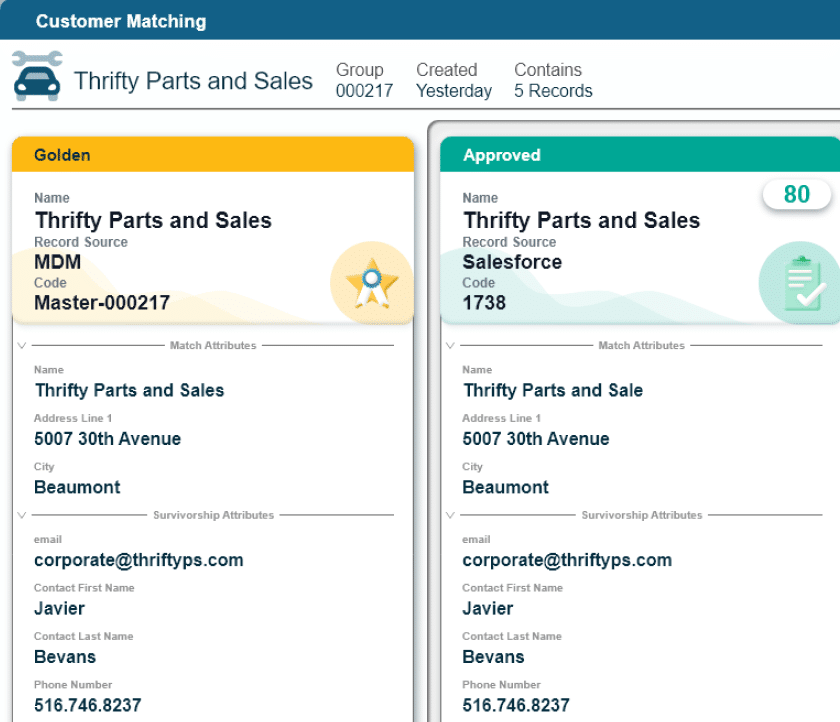
GDPR, CCPA and a growing set of regional data protection regulations require you to know what customer records your organization holds, where they live and who has accessed them. Customer master data management builds the audit trail, consent tracking and stewardship workflows that compliance teams need for regulatory reasons. With an MDM platform like Profisee, they can match and merge customer records across silos into a single trusted view, so reps no longer have to search disconnected systems to find the right record.

5. AI and Automation Expose Weak Customer Data Quickly

AI models trained on siloed or duplicate customer data produce outputs that are difficult to trust and harder to act on. Before deploying AI tools, you need to confirm if the underlying information is consistent and deduplicated. This confirmation is the best way to guarantee that AI models won’t misread the buyers’ behavior, trigger the wrong action or produce inaccurate forecasts.

8 Benefits of Customer Data Integration

When you unify and govern customer records, you get these eight benefits of master data management:

  1. Reduced customer data silos: Stop hunting through CRM, ERP, service and marketing systems to find files. Customer data integration connects records across your workflows, so you can use the same trusted information throughout your business.
  2. Improved enterprise data quality and consistency: Set clear rules for what a complete, usable record looks like. CDI standardizes required fields, formats, source priorities and conflict resolution, resulting in every system using the best information always.
  3. Unified customer view: See each buyer as one relationship, not a collection of disconnected records. A unified profile brings together account details, interactions, preferences and history from every touchpoint.
  4. More effective personalization: Use accurate customer context to tailor outreach, offers and service. Centralized preferences and interaction history help you deliver messages that reflect who the buyer is and what they need.
  5. Stronger analytics and reporting: Make decisions from consistent customer data instead of comparing conflicting reports. A shared customer source makes it easier to measure performance, spot trends and trust the numbers.
  6. Faster access to data: Find the right customer record without searching across disconnected applications. Integrated information gives you the complete, current view needed for sales follow-up, service requests, compliance reviews and account planning.
  7. Lower manual effort and rework: Spend less time fixing duplicate records, mismatched identifiers and conflicting addresses by hand. CDI automates much of the cleanup work.
  8. Greater readiness for AI and automation: Give AI and automated workflows the governed customer data they need to produce reliable results. Golden records improve the inputs behind client segmentation, recommendations, risk scoring and next-best actions.

How to Implement a Customer Data Integration Process

Customer data integration delivers the most value when teams follow a clear, repeatable process. Follow these seven steps to move from business goals to live delivery:

1. Define High-Value Business Outcomes for the Firm

Before starting with any technical architecture work, identify the specific decisions, reports or client interactions that you can improve with unified data. Outcomes such as reduced duplicate customer records or enabling a real-time single buyer’s view give the program a measurable target and a way to demonstrate value to leadership. While a marketing-driven program might prioritize behavioral signals and real-time updates to fuel personalization, a strategy centered on regulatory compliance benefits from identity consistency, consent records and comprehensive audit trails across billing and policy systems.

2. Map the Data Ecosystem Across Source Systems

Create a clear map of every system that holds customer data, including:

  • CRM platforms
  • Billing systems
  • ERP environments
  • Service desks
  • Marketing automation tools
  • Any legacy applications not designed to share data

For each source system, document which customer attributes it contains, what the formats of those attributes are, the frequency of updates and who owns them. A data strategy roadmap becomes the reference document for all matching, transformation and governance decisions that follow. It also surfaces the systems that belong in the integration architecture versus those whose records are too low-quality to contribute meaningfully.

3. Profile and Standardize Client Data for AI Readiness

For organizations preparing for AI use, the profiling and standardization steps aren’t optional because they reveal the actual state of your customer records. The process consists of running automated quality checks across every source to show:

  • Which systems carry reliable information
  • Where the most common data quality issues occur
  • What transformation rules do companies need to bring records up to the enterprise standard

Next is the format standardization of customers’ names, addresses, phone numbers and emails. By this stage, all kinds of information follow a single standard so that matching algorithms compare like with like. If the master data management program finds any records that fail to meet standards, the system sends an alert for stewardship review.

Learn how to build AI-ready data management with Profisee.
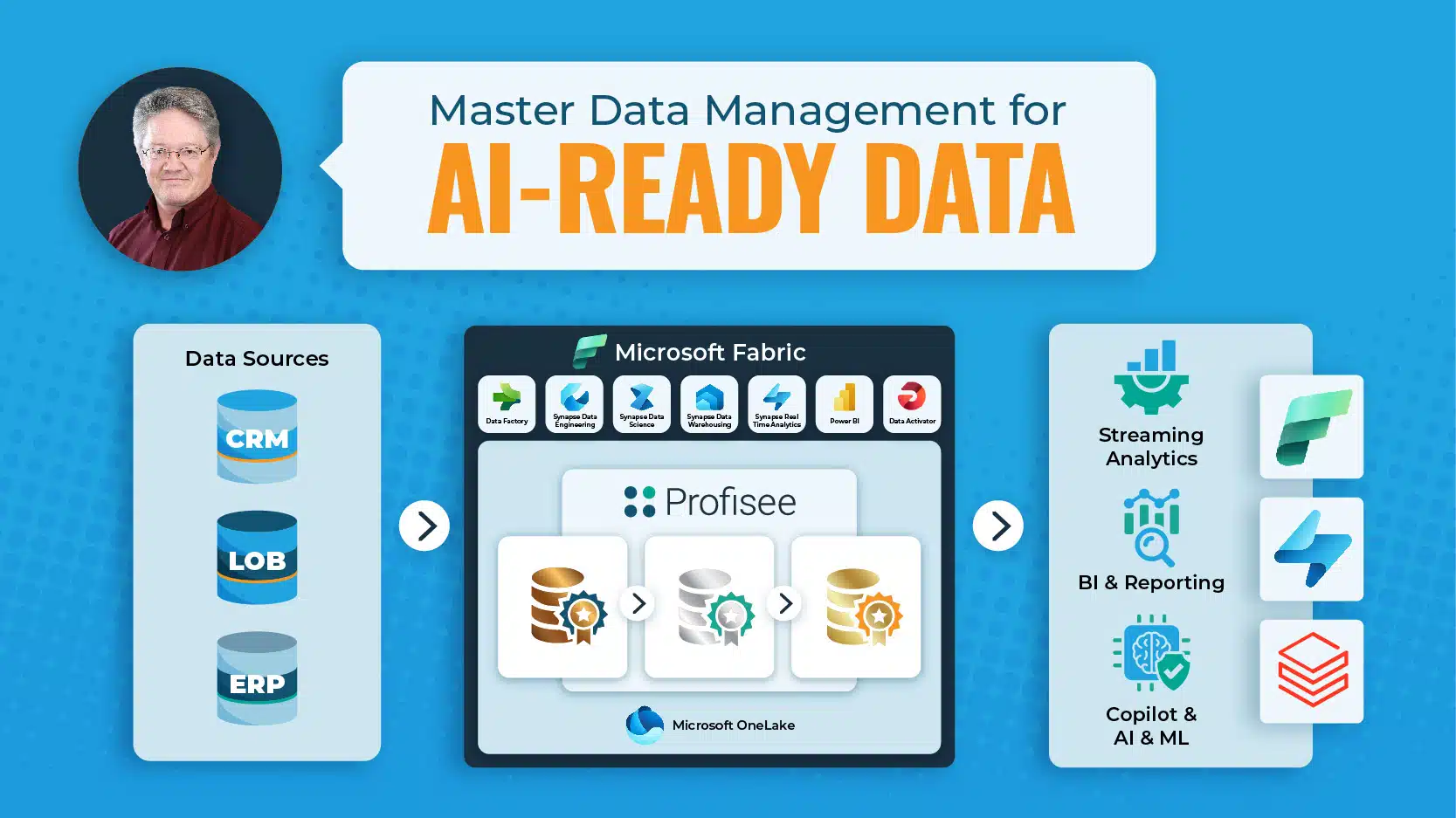
Banner promoting MDM for AI-ready data, including data sources and a Profisee dashboard with Microsoft Fabric.

4. Resolve Complex Client Identities and Establish a Golden Record

Identity resolution is a technically demanding step in a customer data integration process. Multiple source systems often hold records for the same client under different names, addresses and identifiers. The MDM matching engine decides which information represents the same buyer and which is distinct. Most enterprise programs use two techniques in combination to categorize customers:

  • Probabilistic data matching scores the likelihood that two records belong to the same client by comparing field-level similarities: name, address, email and phone number.
  • Deterministic matching uses exact-match identifiers such as tax IDs or account numbers when they exist.

Once matching completes, MDM survivorship rules determine which system’s data becomes the trusted value when duplicate account records contain conflicting information.

5. Implement Governance and Stewardship Tailored to Enterprises

Data governance defines the roles and processes that keep customer information accurate over time. Without this set of rules, CDI produces a clean golden record at launch that degrades within weeks as source systems continue to add duplicates, overwrite good data and create new attribute conflicts. Governance for customer master data covers:

  • Ownership policies that define who is responsible for each customer attribute, source system and approval decision
  • Quality thresholds that trigger human review when a record falls below standard
  • Workflow rules that route exceptions to the right steward for resolution
  • Audit logging that tracks every change for regulatory purposes
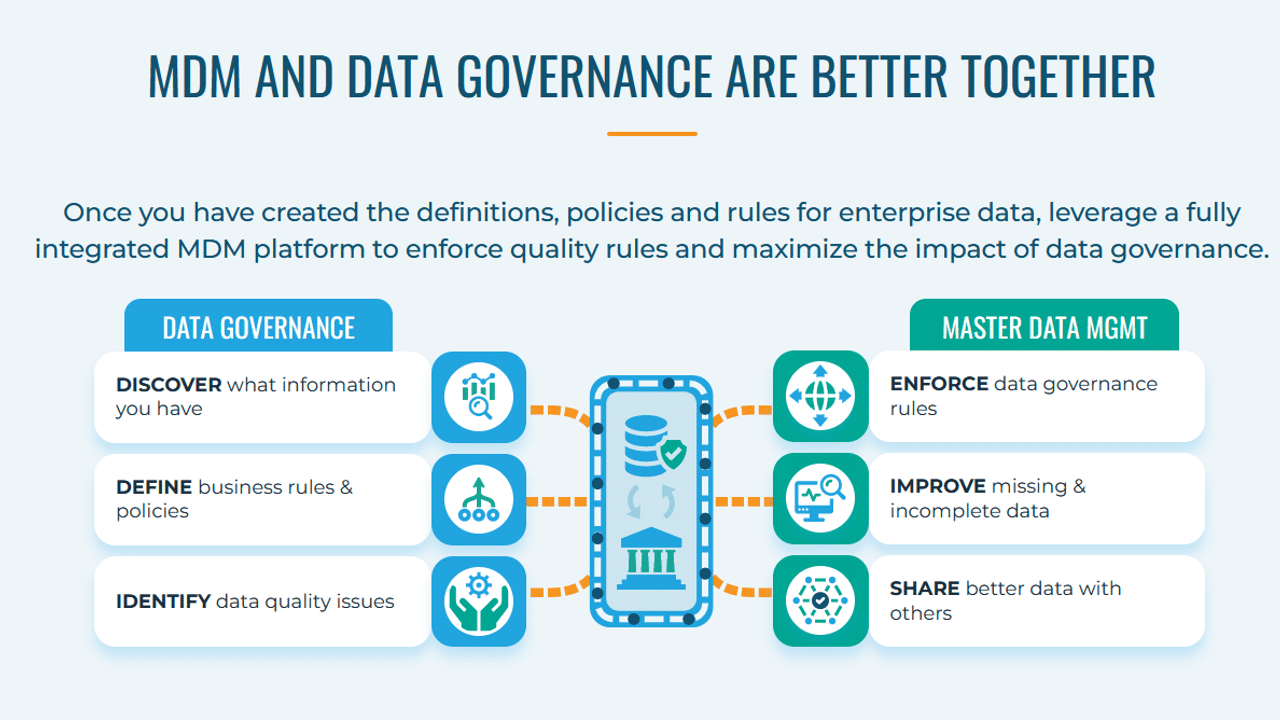
Infographic titled MDM and Data Governance Are Better Together, showing how governance defines and MDM enforces data rules.

Explore the key data governance use cases.

6. Fuel AI and Operational Systems with Trusted Client Data

A trusted golden record is the foundation that AI systems require to perform reliably. Customer churn models, next-best-action engines, revenue forecasting tools and service AI all draw from the buyer’s data as their primary input. When that information is inconsistent or duplicated, model outputs reflect those inconsistencies and teams stop trusting the models. With a governed, deduplicated client record in place, AI systems get consistent input across every run:

  • Marketing teams feed personalization engines with unified customer attributes.
  • Revenue operations build forecasting models on clean account hierarchies.
  • Service teams deliver accurate buyer context at the point of interaction.

7. Monitor Data Quality and Adoption to Prove ROI

Customer data integration programs that succeed long-term treat information quality as a metric. Establish automated monitoring that tracks match rates, duplicate rates, record completeness and attribute coverage on a continuous basis. Adoption monitoring runs parallel to quality monitoring. Track how many downstream systems consume the golden record, how frequently they query it and whether teams that previously used local copies of customer data have migrated to the unified source. Mapping these gains to the original business outcomes, whether revenue, retention or operational cost savings, builds the evidence that sustains executive sponsorship.

The Best Tools for Customer Data Integration

You can combine different types of technology to cover data ingestion, transformation, matching, governance and distribution according to your use cases:

Customer data integration solutionsWhat these tools doUse case in CDI
Master data management (MDM) toolsAn MDM platform like Profisee organizes, matches, governs and synchronizes customer data across enterprise systemsCreate trusted records, resolve duplicates, apply survivorship and support Customer 360
Extract, transform, load (ETL) toolsETL tools extract data, transform it before loading and move it into target systemsPrepare structured customer information for warehouses, reporting environments and downstream quality workflows
Extract, load, transform (ELT) toolsELT platforms load data first, then transform it inside scalable cloud platformsSupport high-volume customer record pipelines across cloud warehouses and data lakes
Data replication toolsData replication solutions copy records continuously from the source to the target systemsKeep client information aligned across operational systems and support disaster recovery or availability needs
Data virtualization toolsVirtualization tools create an online, unified view across sources without moving all the dataLet teams query customer records across systems when physical consolidation doesn’t make sense
Integration platform as a service (iPaaS)iPaaS connects cloud and on-premises applications with connectors, routing and transformation servicesConnect broad applications across CRM, support, e-commerce and marketing systems
Streaming data integration toolsStreaming data integration solutions process and move information as events happenEnable real-time client engagement, fraud checks and operational alerts
Change data capture (CDC) toolsCDC solutions capture inserts, updates and deletes and deliver only those changes downstreamKeep customer-facing and analytical systems updated without reloading full datasets
API integration platformsAPI integration tools design, publish and manage APIs that connect systems and data flowsSupport application-to-application customer record exchange in modern distributed environments

Explore the best master data management tools.

4 Best Practices for Real-Time Customer Data Integration

Not every CDI workflow needs real-time delivery, but the ones that do need a clear operating model. Use these four best practices to support customer data workflows that depend on instant integration, including fraud checks, service alerts, account updates and next-best-action recommendations:

1. Prioritize Real-Time Workflows Where Delays Create Poor Customer Experiences

If your service desk agent is speaking with a high-value customer, they need to know the customer’s recent history immediately to provide a personalized experience. When a business process unfolds in seconds, delayed data can lead to missed signals, slower service and the wrong next action.

Use cases such as fraud detection, service desk personalization and cross-channel engagement rely on the most current information possible. These scenarios justify investment in real-time streaming pipelines — integration paths that capture customer data changes, process them continuously and deliver updated records to downstream systems without waiting for a scheduled batch load.

Identify the business processes where delayed customer data creates a cost you can measure in dollars, time or risk. Examples: fraud losses from missed signals, wasted marketing spend from irrelevant messages and longer service calls from misidentified accounts. Build pipelines for those scenarios first. Applying real-time infrastructure uniformly across all use cases inflates cost without proportional business return.

2. Use Batch Updates for Reporting and Streaming Pipelines for Real-Time Decisions

Batch pipelines collect customer data changes over a set period, process them together and move the updated records on a schedule, such as hourly, nightly or weekly. They’re more cost-effective for large historical loads, routine reporting, data quality cleanup and analytics work where a short delay won’t affect the outcome.

Streaming pipelines handle event-triggered updates that need to move between systems as soon as they happen. They’re better suited for real-time personalization, fraud checks, service alerts and other operational decisions where stale customer data can create immediate risk or a poor customer experience.

Use batch pipelines for your source of truth and streaming for situations when you need live updates of customer information. The result: a flexible, cloud-ready architecture that solves messy record problems without breaking the budget.

3. Capture and Process Only Meaningful Customer Data Changes

Full dataset reloads are expensive in streaming architectures. You don’t want to resend every customer record just because one billing address changed.

Say you need to update a customer’s phone number in your CRM. Change data capture (CDC) detects that a specific update occurred, records what changed and sends only the new value to the systems that need it.

When paired with survivorship rules in a master data management (MDM) platform, CDC helps keep the trusted customer record current without relying on full synchronization cycles that are too slow and expensive for real-time integration at enterprise scale.

4. Enforce Data Quality and Governance Across Streaming Pipelines

Data quality checks should run inside streaming pipelines. Governance policies, field-level ownership, consent flags and access controls apply to streaming information just as they apply to batch.

Treat real-time data quality as an operational metric by tracking measures such as:

  • Duplicate record rate: How often the same person or account appears more than once
  • Match confidence: The certainty level behind a proposed record match
  • Required-field completion: The share of profiles with essential details filled in
  • Address validation pass rate: How many addresses meet approved format and deliverability standards
  • Consent flag accuracy: Whether privacy preferences are up to date and applied correctly
  • Failed update volume: How many updates break, stall or fail to reach the right system
  • Stewardship review volume: How many records need human revision because automation can’t resolve them safely

Set thresholds for each metric and configure alerts when a pipeline starts sending incomplete, conflicting or unauthorized customer data. Choosing the right MDM implementation style determines whether governance runs in the hub, in source systems or across both, a choice that shapes how quality controls integrate into streaming architectures.

Scale Your Customer Master Data Management with Profisee

Customer master data integration works best when you unify, trust and govern information across the enterprise. Connecting source systems is the first step, but maintaining the accuracy, consistency and governance of the resulting records is what determines whether the investment delivers durable value.

The Profisee Platform gives enterprise data practitioners the capabilities that a good CDI process requires at scale:

  • Data connection across cloud, on-premises and the Microsoft ecosystem: Profisee ingests customer records from CRM, ERP, marketing automation, service desk and legacy systems, including native integration within Microsoft Fabric, so every source contributes to the master data.
  • Customer records standardization, matching and merging: Profisee’s ML-powered engine identifies and resolves duplicate information across source systems. Configurable survivorship rules determine which attribute values survive to the golden record, with full stewardship review for exceptions.
  • Customer data integration powered by native governance: Profisee’s Stewardship capabilities keep information automated and current, reducing manual revision burden while maintaining audit-ready quality standards.

All these capabilities help you build a scalable customer data integration process. See it for yourself: Schedule a Profisee demo.

Frequently Asked Questions

The key customer data integration requirements for enterprises are:

  • Batch and real-time support: Enterprise programs often run historical loads, scheduled syncs and event-driven updates at the same time. The platform needs to support each pattern without requiring a new architecture for every use case.
  • Cloud and on-premises connectivity: Large organizations rarely operate in one environment. Customer data has to move across legacy systems, mainframes, ERP platforms and cloud applications without a full migration first.
  • Data quality and standardization: Bad records multiply quickly at enterprise scale. Validation and standardization help prevent thousands of broken customer views before matching begins.
  • Matching and survivorship: Large organizations often hold millions of records across systems with no shared key. Strong matching logic and survivorship rules determine which values become part of the golden record.
  • Data governance and stewardship: Hundreds or thousands of users may create, edit or consume customer data across the business. Clear ownership, thresholds, workflows and policy enforcement keep trusted records from degrading.
  • Auditability and control: Regulated organizations need a complete history of customer data changes. Every update should show what changed, who changed it and when.
  • Scalability across domains: Integration programs often expand beyond customer data into product, supplier, location and other domains. The same foundation should scale across domains without separate implementations for each one.
  • Operational and analytical flexibility: Customer data supports both live business processes and analytical environments. The golden record needs to serve CRM, service, commerce, warehouse, BI and AI systems without lag or duplicate work.

A master data management (MDM) solution facilitates customer data integration by providing the identity resolution and governance layer needed to transform fragmented, raw information into a deduplicated, trusted source of truth that remains accurate over time. While standard integration tools focus on moving data, MDM solutions like Profisee manage the quality and authority of that record through four functions:

  1. Matching customer records across source systems
  2. Applying survivorship rules to produce a single authoritative attribute set
  3. Routing exceptions to data stewards for review
  4. Distributing the resulting source of truth to the downstream systems that need it

Explore the CDP vs. MDM distinction.

Track these key metrics to measure customer data integration success:

  • Match rate and duplicate reduction: Measure the percentage of incoming customer records that the matching engine resolves and the reduction in the total duplicate rate over time.
  • Data quality score improvement: Analyze completeness, accuracy and consistency scores for customer information at the golden record level and by source system.
  • Time to trusted customer record: Measure how long it takes from the moment new data enters the system to a governed, steward-reviewed source of truth being available to downstream consumers.
  • Latency and freshness of SLAs: For real-time integration use cases, review the average and peak latency from the source event to the golden record update and measure SLA compliance over time.
  • Adoption across downstream systems: Count the number of sources and teams actively consuming the golden record.

Your Moment is Right Here, Right Now.

Boards are asking. Budgets are opening. The data work you’ve been quietly doing for years just became the reason you have a mandate – and it won’t stay open forever. Join us at the DATA HERO SUMMIT on October 8 for a half-day of real practitioner stories, and the playbook for what to build next.

Join us at the DATA HERO SUMMIT on October 8 for a half-day of real practitioner stories, and the playbook for what to build next.

LET'S DO THIS!

Complete the form below to request your spot at Profisee’s happy hour and dinner at Il Mulino in the Swan Hotel on Tuesday, March 21 at 6:30pm.

REGISTER BELOW

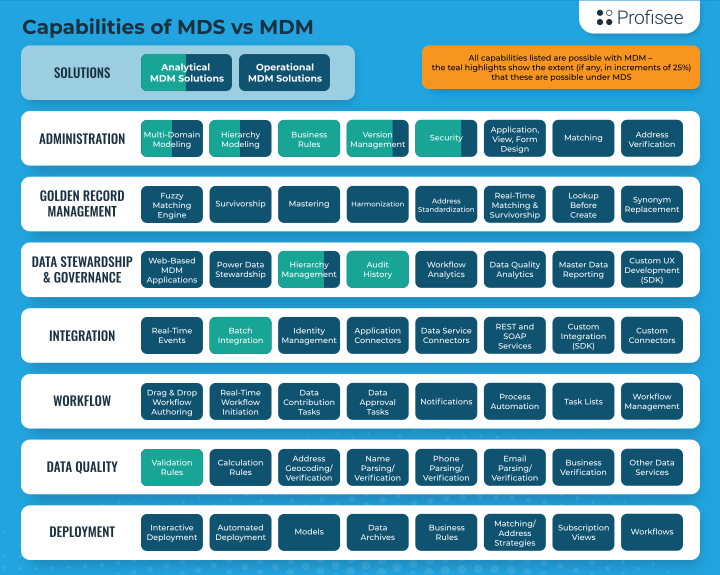
MDM vs. MDS graphic

Data Hero Summit returns October 8 – learn how heroes like you are tackling the biggest data challenges