Accelerate Your ERP Consolidation
Eliminate information silos across multiple ERP systems and instances with master data management (MDM) that matches, merges and governs your ERP master data.
Multiple ERP Systems Can Stifle Innovation
As manufacturers expand their operations or grow through acquisition, they often accumulate multiple ERP instances or systems along the way. Each system stores master data in its own format, so the same supplier or product carries a different name and ID in every ERP.
Your teams have to match records by hand before they can run a report, place an order or pay an invoice, and every manual step adds time and cost. When inconsistent data flows from several siloed ERPs, you risk:
Delays
in financial reporting and analytics
Overpayments
for raw materials
Disruptions
to your supply chain due to the lack of suppliers
Speed up ERP Consolidation and Deliver Value Faster with MDM
Most ERP vendors suggest consolidating ERP instances, a years-long process that only further delays your strategic initiatives.
MDM focuses on your data rather than your systems, delivering clean, trusted and high-quality assets in months, not years. By integrating multiple source systems, including ERPs, CRMs, data warehouses and more, an MDM solution provides you with a universal view of your ERP master data, so you can:
Align Your ERP Master Data Across Systems with Profisee
Merge Data from Multiple Systems and Minimize Consolidation Time
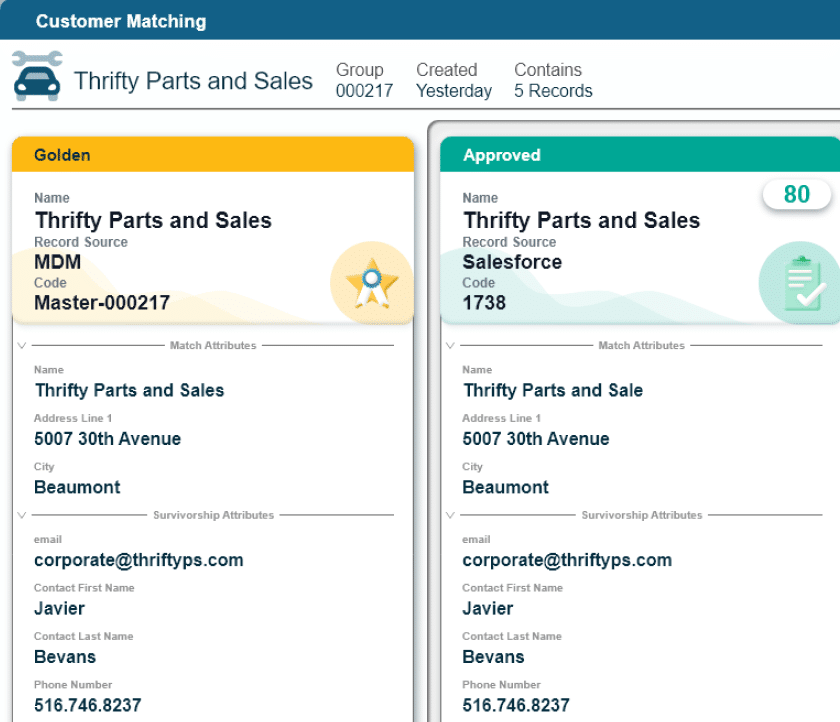
Profisee MDM matches duplicate customer, product and supplier records across your ERP systems and instances, merges duplicates and fixes data quality issues in months instead of years, then merges them into golden records for reliable analytics.
Respond to Supply Chain Disruptions
Profisee MDM builds one golden record for each supplier, product and location across all your ERPs and syncs it back to every source system. When a supplier can’t deliver, your team sees every plant and part that depends on it, and inventory reports line up across sites so you can shift stock or sources.
The Impact on Our Customers
hours saved correcting data
See How Customers Have Optimized Their Operations with Profisee
Transforming Business Operations
Rheem unified data across two business lines and three domains, transforming operations with MDM.
Consolidating ERP Data in Days, Not Years
Trelleborg used Profisee to integrate data from 25 source systems and data warehouses to deliver actionable, high-quality data in under 100 days post-implementation to support LOB financial reporting and demand forecasting.
Creating a Centralized Data Hub
Envista used Profisee to centralize all customer data systems across multiple ERP applications into a single hub serving as a trustworthy view of clean data for strategic cross-sell/upsell opportunities.
Perform master data consolidation across multiple systems with Profisee MDM
Watch an on-demand demo or schedule a customized demonstration to see how Profisee consolidates master data from multiple ERP systems and instances.
ERP Consolidation FAQs
What is ERP consolidation?
ERP consolidation is a process that reduces several enterprise resource planning (ERP) systems or instances to fewer platforms, so the business runs on one set of processes and one version of its core data.
Companies usually end up with multiple ERPs through acquisitions, regional rollouts or business units that picked their own systems. Consolidation cuts licensing and support costs, simplifies reporting and gives leaders one view of customers, products, suppliers and finances. The hardest part of consolidation isn’t the software, but the fact that each ERP stores master data in its own format, and those records have to line up before any migration or cutover can succeed.
Read our use case on ERP consolidation to see how Profisee accelerates master data consolidation across multiple systems.
What is the difference between ERP consolidation and ERP integration?
ERP consolidation reduces the number of ERP systems a business runs, while ERP integration keeps multiple systems in place and connects them so they share data. Consolidation simplifies operations and lowers costs, but a full migration can take years and disrupt the business along the way. Integration moves faster, but it leaves data conflicts in place unless something governs the records moving between systems.
Many companies combine both: they integrate first through master data management implementation, then retire systems in phases once master data lines up across the business.
What is ERP master data?
ERP master data is the core business information that every ERP transaction depends on, which includes:
- Customer records: Names, billing and shipping addresses, payment terms and credit limits that sales orders, invoices and collections draw on.
- Product identification: SKUs, descriptions, units of measure, pricing and product hierarchies that quotes, orders and inventory counts depend on for finished goods.
- Supplier data: Vendor names, tax IDs, payment terms and approved items that purchase orders and supplier payments rely on.
- Material details: Specs, bills of materials and standard costs for raw materials and components that production planning and procurement use to decide what to build and buy.
- Location information: Codes for plants, warehouses and distribution centers that tell the ERP where to store stock, ship orders and book costs.
- Chart-of-accounts records: General ledger accounts and cost centers that each transaction posts to, so finance can report the same way across every entity.
Transactional data, such as orders and invoices, changes daily. Master data changes less often, but every sales order, purchase order and financial report references it. When a company runs more than one ERP, the same supplier or product often exists under different IDs, names and formats in each system.
Mismatches in ERP data cause duplicate records, conflicting reports and failed data loads during ERP consolidation. Master data management (MDM) keeps ERP master data consistent by matching duplicates, applying data quality rules and syncing the corrected records back to each system. Profisee takes this approach for SAP master data management and other ERPs.

How does master data management support ERP consolidation?
Master data management (MDM) supports ERP consolidation by delivering one governed set of customer, product and supplier records to work from before, during and after cutover. Before migration, MDM pulls master data from every source ERP, matches duplicates and flags gaps for data stewards to fix.
During the ERP consolidation, MDM keeps mappings between source and target systems current while the business keeps changing records. After go-live, it continues to govern master data so quality holds.
What are the best integration solutions for merging multiple ERP instances?
The best integration solutions for merging multiple ERP instances are the ones that pair a data integration layer, such as an ETL tool or an integration platform as a service (iPaaS), with a master data management (MDM) hub that resolves conflicting records.
Integration tools move data between systems, but they don’t resolve conflicts on their own. When two instances hold different versions of the same customer, an MDM hub matches the records, applies survivorship rules to build a golden record and sends that record to every connected system.
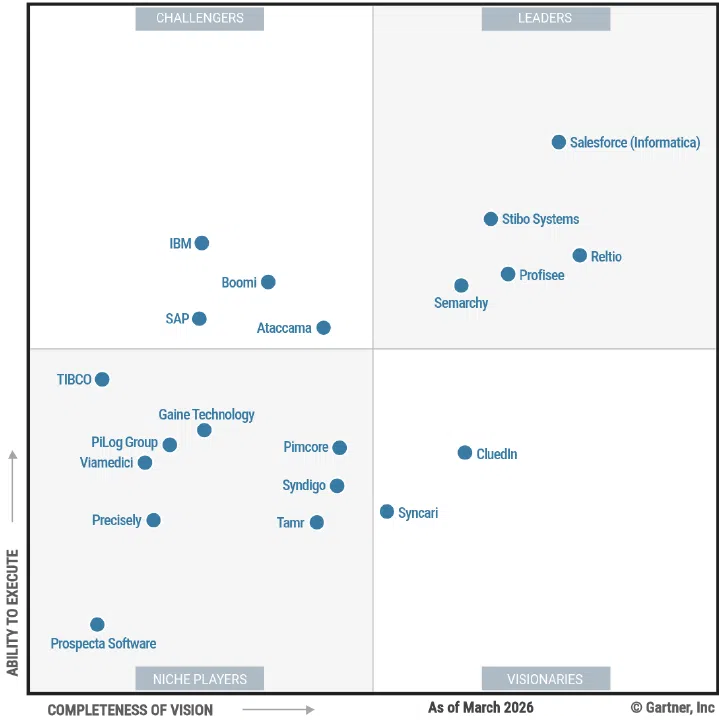
Explore the best MDM tools to choose your ERP data consolidation software.
What should I look for in ERP data consolidation software?
When you compare ERP data consolidation software options, look for integration capabilities and matching engines that show the logic behind the creation of every golden record, such as:
- Prebuilt platform integrations for ERPs, CRMs and data warehouses: Ready-made links to systems such as SAP, Oracle and Microsoft Dynamics 365 that pull and push master data without custom code. With them, your team spends its time fixing the data instead of building and maintaining a one-off integration for every ERP instance.
- Batch, on-demand and real-time integration: Three ways to move data, each suited to a different job. Batch loads handle large historical migrations, on-demand syncs refresh data when a team needs it, and real-time updates push a change, such as a new supplier, to every system as soon as it happens. ERP consolidation needs all three because the business keeps creating records while the project runs.
- Data matching that combines deterministic and probabilistic logic: Deterministic matching links records that share an exact value, such as a tax ID or SKU. Probabilistic matching scores how likely two records are to be the same when names, spellings or formats differ, like “Acme Corp.” in one ERP and “ACME Corporation” in another. Using both catches the duplicates that exact rules miss, without merging records that only look alike.
- Configurable survivorship rules and data steward workflows: Survivorship rules pick which value wins when matched records disagree, based on factors such as recency, completeness or source trust. Data steward workflows send the cases the rules can’t settle to a person for review. Together, they let your business set the rules for its own golden records and keep a human check on uncertain matches.
- REST APIs and webhooks for custom systems: Standard interfaces for systems that have no prebuilt connector, such as homegrown or niche plant applications. REST APIs let those systems request and send master data, and webhooks alert them as soon as a golden record changes, so no system in the consolidation runs on stale data.
How do I consolidate data from multiple ERP systems?
You can consolidate data from multiple ERP systems by following these five steps:
- Inventory the sources: List every ERP instance, CRM and data warehouse that holds master data, and name an owner for each data domain.
- Profile the data: Measure completeness, duplicates and format differences in each source so the team knows the size of the cleanup before work starts.
- Map to a common model: Define a shared data model and map each source field to it, including codes and units that differ between systems.
- Match and merge duplicates: Use matching rules to find the same customer, product or supplier across systems and build one golden record for each.
- Govern the result: Assign data stewards, set data quality rules and sync the golden records to the target ERP and downstream systems.
The Profisee MDM platform automates matching, mapping and data quality checks, so your team spends less time reconciling spreadsheets.