






































- What Is Data Merging?
- Why Merging Data Matters
- When Do You Need to Merge Data?
- Different Types of Data Merging
- 6 Stages of the Data Merging Process
- Common Use Cases for Data Matching and Merging
- Key Challenges During a Dataset Merge
- Best Practices for Effective Data Merging
- Data Merger Tools and Techniques
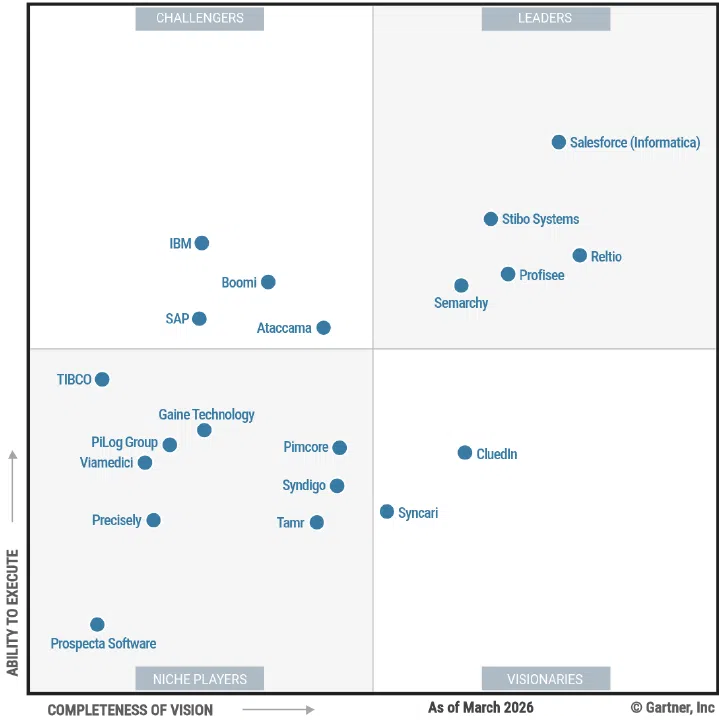
- Merge Data with Profisee
- Frequently Asked Questions
Ready to Transform Your Data?
Key Takeaways
Data merging combines data records from two or more source data sets to produce a single master copy.
Data merging can help the business build a customer 360 view, standardize product listings, improve data analysis and more.
Profisee MDM has data automation, workflows and governance tools to ease data merging and the larger master data management processes.
What Is Data Merging?
Data merging is the process by which data practitioners combine overlapping data records from two or more sources produce a single, master copy. Data merging may combine data from different versions of the same information, such as name formation:- John Doe
- Johnny Doe
- Doe, “Johnny” John
Why Merging Data Matters
Merging data across the enterprise has far-reaching effects for business analytics, compliance and operations. Imagine finding three different versions of a customer name:- John Doe in the CRM
- Johnny Doe in the ERP
- Doe, “Johnny” John in the Marketing Automation tool
When Do You Need to Merge Data?
Businesses often find they need to merge data at several inflection points in the evolution of their data. Common triggers include:- Mergers and acquisitions: M&A success depends on how quickly the new company’s data and KPIs can be understood in the context of the acquirer’s data.
- Migrations: When businesses move between systems, they will need to map existing data to the new system. Large-scale migrations present an opportunity to continue the work across the enterprise.
- Reporting initiatives: Companies that seek to better understand their revenue, customer base and growth trajectory in visual formats need consistency between data sources, which data merging can provide.
- Customer 360: Businesses looking to get a clear, multi-channel picture of their customers’ activity must put data together across all their marketing, sales and engagement channels.
Different Types of Data Merging
The approach you use to merge data will largely depend on the number of sources, the type of data and the results you seek from the merge. These are the four most common types of data merges.- One-to-one merges: This type will merge data from two sources where each row in source 1 matches with a row in source 2. In a one-to-one merge, the combined data will have the same number of rows you started with.
- One-to-many merges: A one-to-many merge may have multiple rows in source 2 that match with a single row in source 1. This data merge would be useful to associate a table of product orders with a table of customer names. In this case, the customer names could link with many different orders in the merged data.
- Many-to-many merges: In a many-to-many merge, several records in source 1 could combine with several records in source 2. An example of this is when you merge data from a product list with a supplier list. Products can have many suppliers, and suppliers can have many products. Without guardrails, this merge can cause a Cartesian explosion that produces multiple inaccurate merges that render the data useless.
- Conditional merges: A conditional merge requires the data professional to provide a condition or rule that guides the merge. This type of merge might combine data records where the name similarity meets a preset threshold. For example, “John Doe” and “Johnny Doe” would merge because the names pass the threshold rule.
6 Stages of the Data Merging Process
The six main stages of the data merging process cover discovery through monitoring. It’s important to remember that this is a cyclical process, so expect to repeat and iterate on this process as you add more data sources and master more data domains. The data matching and merging process listed below also assumes that you have identified the data domain (customer, product, supplier, location, etc.) you want to work with first. We suggest choosing to standardize the data domain that will have the highest impact on existing business initiatives first. For the purposes of this example, we’ll work with customer data.Profile and assess sources
Prior to moving or merging any data, identify each of the sources where customer data lives and document the schemas used to store those records in each of these systems. This profiling work will give you a sense of which sources might have a one-to-one merge and where more complicated processes will need to be used.Standardize and clean
Standardize the data by transforming any schema into the formats you’ve chosen during the golden record management planning stage. For example, different source systems may allow varying versions of street addresses like “123 Sycamore Street” and “123 sycamore st.” To standardize these records, you need to choose the format necessary for business purposes and then change all existing records to this format. Data cleansing is a similar process whereby you identify, update or delete records that are inaccurate or incomplete. To make the highly manual processes of standardization and cleansing faster and more accurate, use an automated tool like Profisee where you can identify the formatting and schema rules that are best for the business and the software will standardize the records for you.Match records
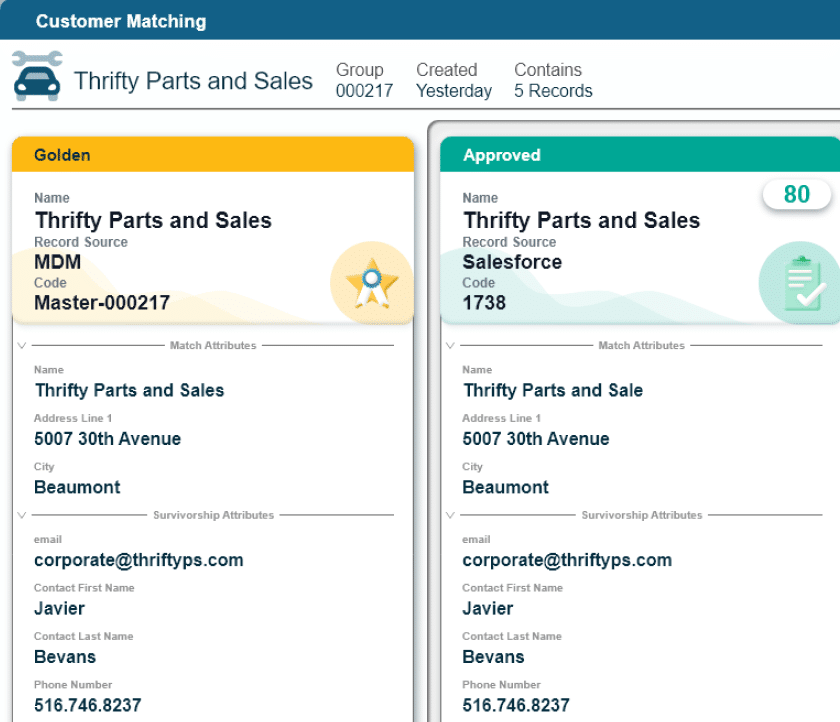
Once all records have been standardized and cleansed, you can begin the matching process where records from one system are compared with records from another. Matching records will be marked to merge, whereas records that only exist in one of the systems will be added to the master list.Apply merge logic (survivorship)
To create the golden record, you need to merge records that have an exact or fuzzy match. The company’s data professionals will apply survivorship rules at this stage to identify which versions of the records “survive” the merge and which are discarded as incorrect, incomplete or incompatible with the established schema. An MDM tool like Profisee can streamline the merge and survivorship process by automating your survivorship logic, which means fewer manual tasks and increased accuracy as the survivorship isn’t dependent on human consistency.Validate merged results
Once you’ve merged a sample set of records, check the work to ensure the resulting golden records meet the data quality standards set for the business. Profisee can help with this validation process by alerting data practitioners to outliers and errors that don’t meet the survivorship rules.Monitor quality over time
It’s tempting to set up the process and let it run unsupervised, but this may cause more work in the long run. Continuously monitor the quality of the golden record data during the data processing stage and return to the golden records to check that incoming data also meets your data quality standards. The data you get from your project should be useful for business users and improve business outcomes. If the data is unusable or unreliable, business users will find other work-arounds that degrade data quality.Common Use Cases for Data Matching and Merging
Data matching and merging isn’t a process meant just for data and IT teams. It’s designed to enable business initiatives that require a dataset merge for reliable, usable data that drives peak performance. Some common data merging use cases include:- Unifying customer data across CRMs: Competing customer lists can happen as a result of mergers and acquisitions, data silos between sales and marketing software or poor interdepartmental integrations across the enterprise. Customer data unification increases personalization options and accuracy, improves customer relationships and increases operational efficiency.
- Standardizing data for AI implementation: AI tools require context and metadata to work effectively. Data standardization and data interoperability prior to implementing AI for the enterprise can lay the foundation for effective contextual work.
- Cleaning vendor/product catalog: Product catalogs evolve quickly, especially with fast-growing businesses. Businesses that take the time to standardize product catalogs and deal with their data duplication problems have fewer order and logistical errors and better customer relationships.
- Consolidating systems after acquisition: Even if the company you acquire uses the same systems, it’s unlikely your data schema matches. Data matching can significantly speed the time to value after an acquisition by allowing a true picture of the new company’s profitability within the context of the existing company.
Key Challenges During a Dataset Merge
A smoothly executed data merge doesn’t happen on its own. Prepare for challenges like the following.- Conflicting values: What happens when the ecommerce tool lists the weight of your product as 1.0 pounds, but the marketing tool lists that weight as 0.1 pounds? You’ll need to independently validate these conflicting values, whether against a separate product catalog data set or some other means.
- Schema mismatch: A schema mismatch often happens between different systems, where attributes (columns) mismatch in various ways, including, but not limited to:
- Different data types
- Numbers vs. letters
- Different attribute order that requires re-mapping
- An evolution within the sources that cause attributes to be renamed
- False positives in matching: Perhaps your product catalog includes products that are mostly the same with small but important differences, such as weight, color or size. Perhaps you actually do have two different doctors named John Smith practicing at the same facility. Work closely with business units to identify these potential challenges.
Best Practices for Effective Data Merging
Effective data merging happens like any other business process — with careful planning and preparation to identify clear goals. From there, follow these best practices when you merge data.Start with clean, standardized inputs
While the data merge process can employ tools like fuzzy matching to improve success rates, you want your data to be as clean and standardized as possible when you begin. Clean data inputs mean that when you combine data, your team can focus on solving more complex challenges with data.Use unique keys where possible
Unique customer, product or vendor keys — numbers or a combination of letters and numbers — make accidental deletion of valid records less likely. Consider implementing product SKUs or unique customer ID keys that verify unique records from duplicate ones.Define clear matching rules
Matching rules dictate how the data matching software proceeds when it identifies a consistent difference in records between sources or one that is outside of the norm. Fuzzy matching rules that set a threshold for similarity before matching work well for situations where records contain varying levels of difference across sources.Use automated validation and quality scoring
Automated validation and quality scoring considerably cut down the amount of time the data teams spend matching data across systems. These tools use third-party tools (free or paid) to identify the correct data for incomplete or inconsistent records. You can also set levels of matching that require human oversight, which means people make the determinations where necessary.Start with small samples
For each new data set you merge, start with samples to test that your matching and survivorship rules continue to meet the needs of the dataset. Combine data in larger batches after matching rules have either been confirmed or updated to avoid bad data outcomes.Document and iterate
Documented policy becomes practice and process. Document your standardization, survivorship and data governance processes so future data and business users can refer to them. Make these policies living documentation by reviewing and making changes according to evolving business practices and needs.Data Merger Tools and Techniques
While you can merge data manually, the addition of software tools will help speed the process considerably. With manual processes, the data team will manually match data sets, usually within a spreadsheet that has been downloaded from the data source. This process is time consuming, tedious and prone to mistakes. Automation tools — from rule-based matching and merging software — to ML-assisted tools make the process easier, although even software-assisted data merging should be validated. When you use rule-based matching to merge data, the tool will match according to the rules you set and identify any outliers, which you’ll need to then validate by hand. It’s best to use these tools with standardized and cleansed data sets. Machine learning-assisted tools will have fewer validation flags due to the ability to apply fuzzy matching thresholds that will merge close matches without oversight. MDM platforms like Profisee can streamline the data merge process significantly by combining the standardization, cleansing, matching, merging, validation, master data management and data governance steps in a single software tool.Merge Data with Profisee
Profisee supports matching, merging, survivorship and data stewardship by helping data practitioners and business data owners illuminate and automate their master data processes. With tools like AI-assisted fuzzy matching and merging and automated workflows, Profisee provides the speed and scalability necessary for enterprise companies to build reliable golden records that improve business outcomes. Profisee also offers an OpenAPI REST service and is available as a native Microsoft Fabric workload to connect quickly and maintain quality data for the long term. See data merging in action. Book your Profisee demo today.Frequently Asked Questions
Data merging is the process of picking and choosing the most accurate, up-to-date data attributes about the same data entity from two or more source systems into a single record. Data integration is a necessary first step before data merging can take place. It describes a process where data from different disparate source systems is brought together into a central repository so that it can be matched, merged, standardized and made available to the downstream systems that need access to it.
The best way to deal with duplicate data is to follow these steps:
- Identify the potential duplicates by flagging them in the data set.
- Standardize the duplicate records to ensure that they actually are duplicates.
- Merge the data according to pre-set survivorship rules to fill gaps or address inconsistencies. Consider recency, completeness or third-party validation in survivorship rules.
- Validate the results post-merge.
Maintaining data quality during a merge takes careful planning of matching and survivorship rules that meet the business needs, working with small data sets before big ones, using MDM automation and a data workflow management tool to avoid human error and validating the results.
Schema alignment in data merging is the process of mapping attributes across different datasets so that their structures and meanings correspond correctly. For example, one dataset might store a person’s name as a single “FullName” field, while another splits it into separate “FirstName” and “LastName” fields. Aligning those schemas means deciding how to reconcile those structural differences before merging. This could be as simple as combining the two fields into one or splitting one field into two.
If structural differences like these aren’t accounted for, data can end up misrouted, duplicated or lost during a merge. You can avoid scenarios like this by creating a solid data model at the outset of your data governance program that takes schema alignment into consideration.
A successful data merge happens when the resulting single dataset contains reliable, complete and up-to-date data. Often a successful data merge will contain data that is better than either of the original source data sets on their own, as duplicates, inconsistencies and errors are corrected.

Benjamin Bourgeois
Ben Bourgeois is the Head of Product and Customer Marketing at Profisee, where he leads the strategy for market positioning, messaging and go-to-market execution. He oversees a team of senior product marketing leaders responsible for competitive intelligence, analyst relations, sales enablement and product launches. He has experience managing teams across the B2B SaaS, healthcare, global energy and manufacturing industries.